Codex helped me start a hardware project: an ESP32 Ad Blocker
Before, I used Codex only on digital products, but then I realized that it could also be used to get started with hardware more easily than ever before. Without learning a new programming language, I could ask Codex to help me change the firmware of a microcontroller.
So I bought an ESP32 and asked it to help me build an ad blocker for my local network.
Ad blocking on an ESP32
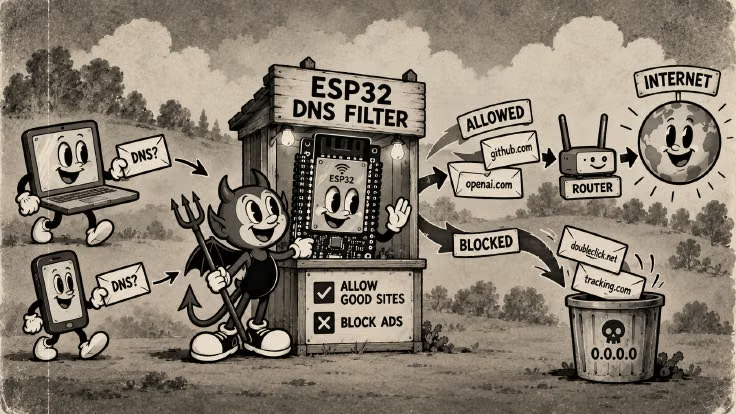
I found M-Abozaid’s ESP32-C3 AdBlock project on GitHub and adapted it to my ESP32-D0WD-V3 board. I’ve been fascinated by two ideas:
The trick everyone misses: you do not need to keep the blocklist in RAM. Store the domains as sorted 40-bit hashes in flash and binary-search them. 140,000+ domains fit in ~0.7 MB of flash and are matched in ~10 ms, using ~50 KB of RAM.
This means that a simple device can handle a job traditionally done by a Raspberry Pi or a dedicated server.
Another idea that I found absolutely genius is that you can attach the ad blocker to the router by USB—not to connect the firmware to the router, but simply to power the ESP32, as shown in a post by Psalteric.

On top of that, I used an e-ink display to show some basic information, but that part was purely optional.
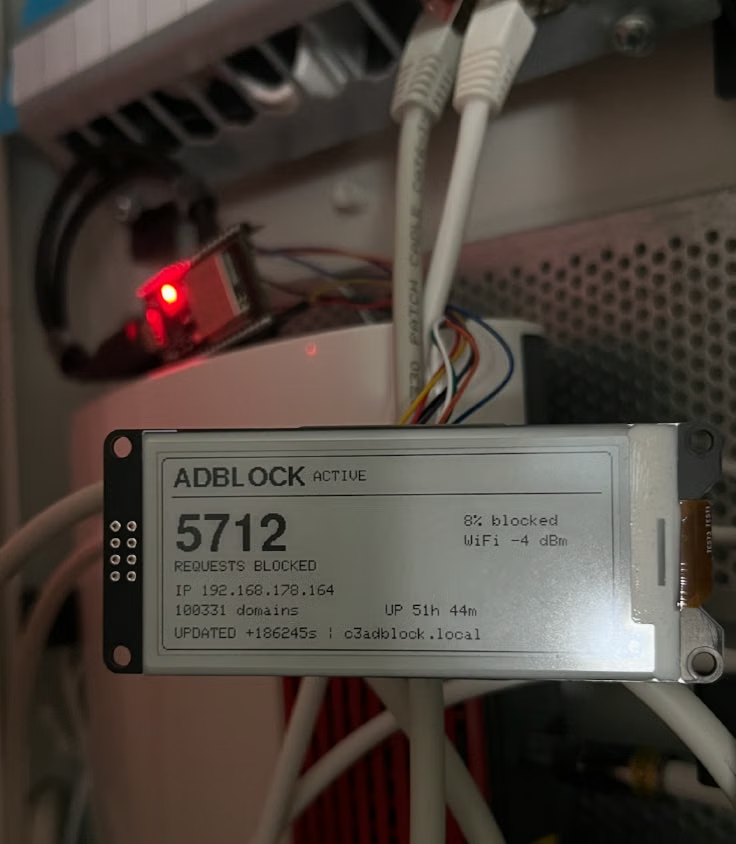
Note: the 8% shown on the display is the share of DNS requests blocked in that snapshot, not an 8% measure of the ad blocker’s effectiveness. It depends on the traffic, websites, devices, and time period being observed.
So now my ESP32 ad blocker contains a blocklist combining StevenBlack Base and HaGeZi Light, with 100,331 sorted 40-bit hashes. Blocked A records return 0.0.0.0, while blocked AAAA records return an empty answer. The ESP32 handles DNS only; web traffic still goes directly from each client to the internet.
Improving the ESP32 Ad Blocker
The firmware uses asynchronous UDP ingress, response and decision caches, a prefix index, and six-millisecond reply pacing. AI agents helped me inspect the code, adapt the display task, test the DNS behavior, and verify the firmware image against the physical flash limits.
The DNS implementation was also significantly improved:
- Asynchronous DNS: DNS was rewritten from synchronous to asynchronous. The original project used
WiFiUDP, where a request could block the main loop for up to one second. The new version uses project-localDnsAsyncUDP, a 64-entry packet queue, and up to 64 pending upstream requests. - Upstream failover: Upstream DNS failover was added, using Quad9 at
9.9.9.9as the primary server and149.112.112.112as the secondary server. Requests have a bounded 1.5-second timeout, and upstream responses are validated before being accepted. - Packet handling: DNS packet handling was improved with support for packets up to 1232 bytes, EDNS-compatible queries, stricter malformed-packet validation, correct A/AAAA handling, and preservation of the client’s original transaction ID.
- DNS acceleration: DNS acceleration was added through an LRU cache for A/AAAA responses, an LRU cache for allow/block decisions, a prefix index for the blocklist, optional coalescing of identical queries, six-millisecond reply pacing, and automatic fallback when errors increase. Experimental prefetching exists but is disabled in the production profile.
Improving website loading time on macOS
Switching between macOS and FreeBSD, I noticed how fast networking feels on FreeBSD and how noticeably slower it can be on macOS. So I started investigating this with Codex.
After some tests, it found better TCP settings for macOS, which improved website loading.
For these tests, I tuned several macOS TCP parameters, including the default MSS, send and receive buffer sizes, TCP window scaling, and delayed ACK behavior.
Then I combined those changes with the ESP32 AdBlocker to speed things up even more.
Ethernet results
| Configuration | Median navigation time |
|---|---|
| ESP32 DNS / Optimized TCP | 0.364 s |
| Router DNS / Optimized TCP | 0.423 s |
| Router DNS / Default TCP | 0.447 s |
Wi-Fi results
| Configuration | Median navigation time |
|---|---|
| ESP32 DNS / Optimized TCP | 0.378 s |
| Router DNS / Default TCP | 0.432 s |
| Router DNS / Optimized TCP | 0.433 s |
With these changes, websites load blazing fast. Sometimes it feels almost as if they were opened from local storage rather than from the web.
What’s your take? I’d love to hear it.