How to Add Media Keys to a Vintage Apple Keyboard with macOS hidutil
I use a vintage Apple Keyboard A1048 every day because I like how it feels. The one thing I miss is a set of dedicated media keys. When this keyboard was released, Apple keyboards did not have dedicated media keys.
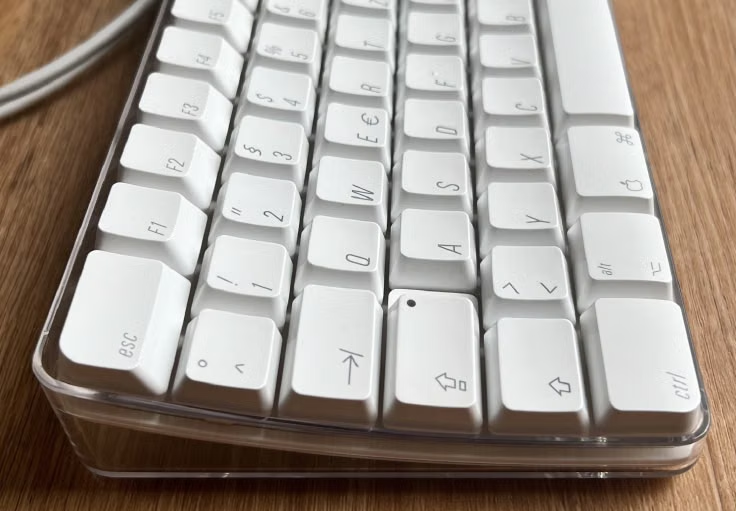
My Apple Keyboard A1048, with the F7, F8, and F9 keys mapped to media controls.
I wanted F7, F8, and F9 to control the previous track, play or pause, and the next track, just as they do on my modern MacBook. I also wanted to avoid installing another utility just for this small change.
Karabiner-Elements is a popular way to customize keyboard behavior, but macOS already includes a small utility for this: hidutil. I used it to map the keys directly:
- F7 (
0x000700000040) → Previous Track (0x000C000000B6) - F8 (
0x000700000041) → Play/Pause (0x000C000000CD) - F9 (
0x000700000042) → Next Track (0x000C000000B5)
Here is the complete LaunchAgent property list, stored at ~/Library/LaunchAgents/com.user.hidutil.plist:
<?xml version="1.0" encoding="UTF-8"?>
<!DOCTYPE plist PUBLIC "-//Apple//DTD PLIST 1.0//EN"
 "http://www.apple.com/DTDs/PropertyList-1.0.dtd">
<plist version="1.0">
<dict>
  <key>Label</key>
  <string>com.user.hidutil</string>

  <key>ProgramArguments</key>
  <array>
    <string>/usr/bin/hidutil</string>
    <string>property</string>
    <string>--set</string>
    <string>{"UserKeyMapping":[{"HIDKeyboardModifierMappingSrc":0x000700000040,"HIDKeyboardModifierMappingDst":0x000C000000B6},{"HIDKeyboardModifierMappingSrc":0x000700000041,"HIDKeyboardModifierMappingDst":0x000C000000CD},{"HIDKeyboardModifierMappingSrc":0x000700000042,"HIDKeyboardModifierMappingDst":0x000C000000B5}]}</string>
  </array>

  <key>RunAtLoad</key>
  <true/>
</dict>
</plist>
After saving the file, load it into your current login session with:
launchctl bootstrap gui/$(id -u) ~/Library/LaunchAgents/com.user.hidutil.plist
The RunAtLoad setting makes the LaunchAgent run the mapping command when it loads at login. The remapping works great for my setup, and I did not need to install an extra keyboard utility.
What’s your take? I’d love to hear it.